
My Claude AI and general AI stuff.
TL;DR
- Claude is stateless = Every time you respond, the whole conversation is sent and re-read so your token usage gets exponentially more on every response.
- Use
/compactto reduce your conversation size/contextwill show your current conversation token usage.- Use CLAUDE.md to reduce token burn.
- Plan Mode is very useful
- **need to chase this** Jobs that don't need an immediate response can run at a 50% discounted token rate, useful for conversions.
- Pro or Enterprise plan is needed to use Claude in your IDE (i.e. Claude Code)
General AI
These will all apply to claude, but also other AI environments.
- My Thoughts
- AI is not always right, even though it says it is.
- Claude will tell you when it cannot give an answer, which is an improvement.
- A new conversation is not always best.
- Compact your conversation to prevent token burn however this can cause loss of important information.
- New feature, new conversation
- 15 to 20 messages is sweet spot.
- AI can hallucinate after this
- Circular thinking can also start occuring.
- The better the prompt, the better the result.
- Be concise even if you think what your are saying is stupid and it should know.
- Don't be lazy
- In `Exclusive File Locking` I had a lot of issues because Claude decided (on it's own) to use stripped Scintilla headers.
- Don't let Claude cut corners, specify what libraries to use and be as precise as you can to prevent random thinking.
- Claude is good at stuff everyone does because it is trained on that sort of data, but weird edge cases, it will need you to point stuff out (i.e. the Eureka moment) or it will get confused and give poor outputs.
- AI is not always right, even though it says it is.
- Tutorials
- How AI agents & Claude skills work (Clearly Explained) - YouTube | Greg Isenberg - I sit down with Ras Mic to break down how AI agents actually work and why most people are using them wrong. Ras Mic explains the mechanics of context windows, makes the case that agent md files are largely unnecessary, and shares his step-by-step methodology for building custom skills that make agents dramatically more productive. Whether you're coding with Claude Code or automating workflows with OpenClaw, this episode gives you the foundational knowledge to stop wasting tokens and start getting real results from your AI tools.
- 18 Months of AI Coding Lessons in 18 Minutes (10 Tips) - YouTube | GritI Studio
- AI coding tips that actually work. After 18 months of daily AI coding with Cursor, Claude Code, and other tools, I have distilled everything I learned into 10 tips you can learn in 15 minutes. These are battle-tested workflows I use every single day—no hype, just what actually works.
- The models we use today are probably the worst models you will use for the rest of your life. In the past year alone, we have gone from AI that could barely autocomplete a function to agents that write entire features, create branches, and open pull requests while you drink your coffee. Hate it or embrace it—AI-assisted coding done the right way is a superpower!
- Free AI Courses with Certificate | FreeAcademy.ai - Free AI courses with certificate. Learn ChatGPT, Claude & practical AI skills — 100% free, no coding required.
- Swap
EnterandShift+Enterkey behaviour / Disable Enter sending message- GitHub - deerhnt/chat-key-changer - "Chat-Key-Changer" is a Chrome extension that swaps Enter and Shift+Enter key behavior in AI chat services for improved usability.
- Solving the Enter Key Frustration in AI Chat: "Chat-Key-Changer" Chrome Extension - DEV Community
- Hello everyone! Have you ever experienced the frustration of accidentally sending an incomplete message while chatting with AI?
- I regularly use ChatGPT, Claude, GitHub Copilot, and other AI services, but I often found myself accidentally hitting Enter while typing long messages, thinking I was adding a new line but ending up sending an incomplete message instead.
- So I built a Chrome extension to solve this small but persistent annoyance - let me introduce it to you!
- Solving the Enter Key Frustration in AI Chat: "Chat-Key-Changer" Chrome Extension - DEV Community
- Chatgpt No Enter Chrome Extension - Amperly - Stop sending AI chat messages by accident. This Chrome extension prevents accidental sends in ChatGPT, Claude, Google Gemini, Grok, and Microsoft Copilot.
- Disable Enter in ChatGPT - Chrome Web Store - Prevents accidental sends in ChatGPT, Gemini, Claude, Copilot, Grok. Enter = newline, Ctrl+Enter = send.
- GitHub - deerhnt/chat-key-changer - "Chat-Key-Changer" is a Chrome extension that swaps Enter and Shift+Enter key behavior in AI chat services for improved usability.
- AI Comparisons
- Gemini CLI vs Copilot CLI vs Claude Code — Full Comparison (2026) | FreeAcademy.ai - Gemini CLI vs GitHub Copilot CLI vs Claude Code — compare features, pricing, and real-world performance. Includes a dedicated Gemini CLI vs Copilot CLI head-to-head breakdown.
- 3rd Party Libraries / Software
- GitHub - pytorch/pytorch
- Tensors and Dynamic neural networks in Python with strong GPU acceleration
- Has extensive Claude integration
- This is an AI neural net thing.
- GitHub - pytorch/pytorch
- AI Watermarks
- AI Watermarks: News, Guides & What You Need to Know | ClearPaste - Claude watermark, Gemini SynthID, C2PA and what an AI text cleaner can actually remove.
- Claude AI Watermark: What It Is & How It Works | ClearPaste - Anthropic announced invisible text watermarking for future Claude models. What it is, what it isn't, and what a text cleaner can actually remove.
- Remove custom formatting from AI responses / Copy and Paste Cleaners
- Clean Paste AI · Clean Paste Tool for AI Output
- Strip invisible Unicode spaces, zero-width tags, and unwanted markdown before pasting into docs. Inspect exact residue counts to keep formatting clean.
- Free and Pro
- Clean Paste | AI Text Cleaner for Natural Copy
- Clean Paste cleans copied text, removes hidden paste noise, and rewrites AI drafts into natural copy while preserving meaning, keywords, and structure.
- Free and Pro
- Wipe AI - Clean text from AI traces
- Free tool to clean text from hidden AI traces: invisible characters, zero-width spaces, watermarks and formatting artifacts. Runs in your browser; supports DOCX and TXT.
- Free ans Pro
- AI Text Cleaner — Remove Hidden Characters from AI-Generated Text
- Free tool to clean ChatGPT, Claude, and Gemini output. Removes invisible characters, smart quotes, em dashes, non-breaking spaces, and markdown leftovers in your browser. No sign-up.
- Free
- Clean Paste - Remove AI Watermarks & Invisible Characters from Text
- Remove hidden metadata and AI watermarks from generated text with Clean Paste. Instantly clean up AI content to make it look human and bypass AI detection.
- Free
- Clean ChatGPT & Claude Text — Free AI Text Cleaner | ClearPaste
- Strip markdown, invisible Unicode and formatting artifacts from ChatGPT, Claude and Gemini text. Free, private, in your browser.
- Free
- Clean AI Text Instantly | Remove Markdown & Weird Formatting
- Paste text from ChatGPT, Claude, Gemini, or other AI tools and instantly remove Markdown, weird spacing, hidden characters, HTML tags, and messy formatting.
- Free
- Clean Paste AI · Clean Paste Tool for AI Output
Official Claude Sites
- Status
- Claude Status
- Claude's home for real-time and historical data on system performance.
- Not very live, during an outage this page is not updated in real time.
- At least a 1 hour delay before an incident is updated here.
- Claude Status - Real-Time Outage & Uptime Monitor (not official)
- Check if Claude AI is down right now. Real-time status monitoring, uptime history, latency metrics, and incident tracking for claude.ai, Claude API, and Claude Code.
- Community-powered outage reports and alerts.
- Why this site exists: The official status.claude.com page is intentionally conservative — it reflects what Anthropic has confirmed and posted, not what users are seeing in real time across countries, regions, and surfaces (claude.ai vs. the API vs. Claude Code).
- Claude claude.ai Status. Check if Claude claude.ai is down or having an outage. | StatusGator (not official)
- This has community updates.
- Claude Status
- Docs
- Endpoints
- platform.claude.com
- api.anthropic.com - Claude API endpoint.
Claude Plans
- Claude Free Plan Limits 2026: What You Get, What You Don't, and When to Upgrade | FreeAcademy.ai
- Everything about Claude free plan limits in 2026 — message caps, model access, which features are free vs paid, and exactly when upgrading to Pro or Max is worth it.
- Limits are dynamic: during peak hours or heavy server load, you may hit caps sooner
- Claude Pro vs Max vs Free (2026): Usage Limits Compared | FreeAcademy.ai
- Claude Free vs Pro vs Max compared for 2026: usage limits, pricing, the real difference between Pro and Max, and which plan is actually worth it.
- Claude Code is Anthropic's terminal-based AI coding agent. It reads your entire codebase, writes and edits files, runs commands, and handles multi-step development tasks autonomously. It requires a Pro subscription or higher.
- Claude pricing and plan limits explained: Full guide to free, Pro, Team, and Max tiers | datastudios.org
- Anthropic’s Claude platform offers a structured set of subscription plans designed for individuals, professionals, and teams.
- Each tier differs in terms of model access, context window sizes, usage quotas, and pricing options, making it important to choose the right plan based on workload and expected performance.
- Claude’s free plan offers Sonnet 4 with shorter session windows.The free plan provides access to Claude Sonnet 4, optimized for balanced performance and speed. Users can open multimodal
Claude Products/Software
Claude Desktop
- Chats and settings are shared with the Web based Claude.ai which is very useful.
- Claude Desktop - Claude MCP Clients
- A powerful desktop application that interacts with Claude AI through the Model Context Protocol.
- The unique advantage of Claude Desktop lies in its ability to extend functionality through MCP server configuration.
- Install Claude Desktop | Claude Help Center
- Setting up Claude Desktop: Environment Configuration, External Tool Integration and Plan Overview | DevelopersIO
Claude Cowork
- Claude Cowork: Claude Code power for knowledge work | Claude by Anthropic
- Give Claude access to your local files and let it complete tasks autonomously.
- Claude Cowork brings Claude Code's agentic capabilities to the desktop app for non-technical work.
- Unlike Chat, Cowork lets Claude complete work on its own. Describe the outcome and cadence, and it takes action and keeps you informed. Come back to the result.
- Claude Cowork | Anthropic’s agentic AI for knowledge work Anthropic
- Claude Cowork is a system built by Anthropic that executes multi-step knowledge work on a user's behalf, including research synthesis, document preparation, and file management.
- It is not a chat assistant.
- Claude Cowork handles tasks autonomously. Give it a goal and Claude works on your computer, local files, and applications to return a finished deliverable. If it’s repetitive, messy, or just taking too long, assign it to Claude.
- Claude Cowork, a research preview | Claude by Anthropic
- Claude Code's power without the terminal.
- Cowork brings Claude Code’s execution power to Claude Desktop for knowledge work, instead of just code. Delegate complex tasks that pull from multiple sources, need sustained effort, and produce real deliverables. The terminal happened to be where Claude Code lived. Now, that power runs directly on your desktop through a familiar interface.
Claude Code
- Is an agentic coding tool that handles entire development workflows through natural language.
- This is the agent app that integrates with software like VSCode.
- Auto mode is now Claude Code's default permission mode.
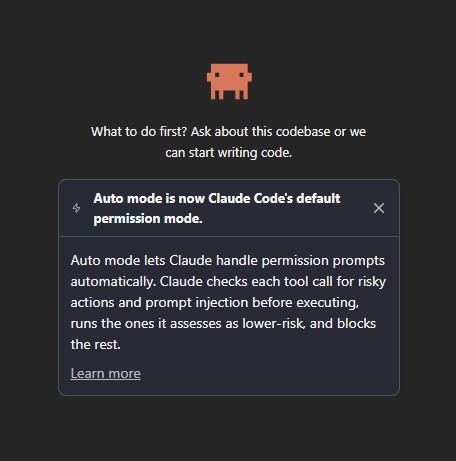
- The new default mode, automatically allows all read permissions but no writes.
claudeCode.initialPermissionMode- This controls the Claude Code: Initial permission
- Initial permission mode for new conversations.
- Unset defers to the Claude Code CLI's resolved default for the session.
- 'manual' is an alias for 'default', the mode labelled Manual in the UI; set either to always start in Manual.
- For me this setting is empty.
- Choose a permission mode (VSCode) - Claude Code Docs - Control whether Claude asks before acting. Switch permission modes with Shift+Tab in the CLI, the mode indicator in VS Code, or the mode selector in Desktop.
Other
- Claude MCP Clients - Explore various client applications implementing the Model Context Protocol (MCP)
Using Claude
Things I should do
- Disable enter sending message
- Goto Privacy Settings --> Toggle "Help improve Claude" to OFF
- When developing, after each successful feature is added, make sure you do a commit as Claude has a habit of breaking stuff.
- Don't let conversations get too long otherwise you might be burning tokens for reading the history when you don't need to.
- On windows, tell Claude to use PowerShell and not BASH because windows does not have this shell.
- **where should i put this? A local system config?
- Disable Enter sending message
Tutorials
- Full Claude Code Tutorials
- Claude Code - Full Tutorial for Beginners - YouTube | Tech With Tim
- This video will teach you Claude Code. I'll go over everything and assume no prior knowledge. I'll walk you through the setup and installation. I'll show you how to utilize the tool, the best practices, multiple features, and by the end of the video, you'll be comfortable using this tool to generate some pretty insane outputs and awesome coding projects.
- Full Claude Code Tutorial for Non-Technical Beginners in 2026 (step-by-step) - YouTube | Futurepedia
- Uses the Desktop App.
- This video is a comprehensive, non-technical guide to Claude Code, showing you how to build an app step-by-step without any coding.
- We cover six different projects, including a website, a game, an automation connecting external tools, and a mobile app with AI Vision.
- This is all done through the Claude Code desktop app with no coding and at a beginner level starting from zero knowledge.
- Utilize the power of AI agents and AI automation even if it's your first time using it. Discover the possibilities with Claude AI and a no code app builder to bring your ideas to life, and learn how to build an app with ease.
- CLAUDE CODE FULL COURSE 4 HOURS: Build & Sell (2026) - YouTube | Nick Saraev
- The end-to-end, definitive course on Claude Code for beginners! I'll take you through a full four-hour masterclass where I start by teaching you how to set up and install Claude Code in a tutorial, how to configure your IDE or integrated development environment (we'll use Antigravity), how to utilize your CLAUDE.md file as your project brain, how to build your first project in Antigravity using Claude Code in under 15 minutes, advanced Claude Code functionality including hooks, slash commands, and more.
- I also teach you how to spin up multiple Claude Code instances and have them work on your behalf; how to parallelize work using sub-agents; how to use Git work trees to accomplish many hours of work in just a few minutes; how to conserve tokens and use context management to crush your coding and software projects; how to deploy things to the cloud using Modal and related services, and in general... how to be awesome at Claude Code! Hope you enjoy the tutorial.
- Master 95% of Claude Code in 36 Mins (as a beginner) - YouTube | Nate Herk
- In this video, I break down everything you need to know to use Claude Code effectively for building automations.
- I cover the interface and what actually matters, the WAT framework we use to build every automation, how to communicate clearly with Claude Code and get it to ask the right questions during planning, the superpowers like MCP servers and Claude skills, and how to test, optimize, and deploy your workflows so they run automatically.
- No fluff, I build a real workflow live so you can see exactly how it all comes together. By the end of this video, you'll understand Claude Code better than most people using it and have a clear framework for building your own workflows.
- Claude Code: Rules, Memory, and Skills - YouTube | ExamPro
- This video covers how to use claude.md, rules, memory, and skills to create better project context, more consistent behaviour, and stronger day-to-day workflows.
- Claude Code - Full Tutorial for Beginners - YouTube | Tech With Tim
- VSCode
- How to Use Claude Code in VS Code in 3 Minutes - YouTube | Nic Conley
- In this video I show you how to use Claude Code inside of Visual Studio Code in less than 5 min.
- This is beginner friendly and gives you access to the most powerful version of Claude Code. Once downloaded, you'll have access to plan mode, one of Claude Code's most powerful features.
- Use Claude Code in VS Code - Claude Code Docs - Install and configure the Claude Code extension for VS Code. Get AI coding assistance with inline diffs, @-mentions, plan review, and keyboard shortcuts.
- How to Use Claude Code in VS Code in 3 Minutes - YouTube | Nic Conley
Cheat Sheets
- Claude Code Cheat Sheet - Shortcuts, Commands, Tips [2026] | Computing for Geeks - Claude Code cheat sheet for 2.1.x: Opus 4.8 default, background agents, slash commands, CLI flags, /code-review, MCP servers, hooks, and DevOps tips.
Commands
- Commands - Claude Code Docs - Complete reference for commands available in Claude Code, including built-in commands and bundled skills.
/context- This will show you your token usage
/compact- This will reduce your context window size by summarising the content, thus using less tokens to describe the same thing. You can give natural language instructions to help with the process so key information does not get lost.
- What Does /compact Do in Claude Code? (Context Management Explained) | How Do I Use AI - The /compact command compresses your conversation history into a summary, freeing up tokens without losing context. Here's when and how to use it.
- How to Use the /compact Command in Claude Code to Prevent Context Rot | MindStudio - Running /compact at 60% context capacity—not 95%—keeps your Claude Code sessions sharp. Learn when and how to compact with specific preservation instructions.
- How to Use the /compact Command in Claude Code to Manage Context Efficiently | BSWEN - This post shows how to use Claude Code's /compact command effectively. The key is running it at 70-75% context usage with focused instructions.
- Context Compaction: The Technical Guide to Deletion-Based Context Management | Morph - Context compaction reduces LLM context windows by deleting low-signal tokens rather than rewriting them. This guide covers verbatim compaction, token-level pruning, observation masking.
- Understanding "Context Left Until Auto-Compact: 0%" in Claude CLI | by Lalatendu Keshari Swain | Medium
- Imagine you’re deep into a complex project — debugging intricate algorithms, refining codebases, or brainstorming architectural decisions — when suddenly, a cryptic message flashes across your terminal: “Context left until auto-compact: 0%.
- In this post, we’ll unpack exactly what this means, why it happens, and how to address it step by step.
/effort- How to Change Claude Code Effort Levels in VS Code (/effort) - Learn how to use /effort in Claude Code for VS Code to switch between Low, Medium, High, and Max reasoning levels. Save tokens and get faster responses.
/init- This reads your project and stores a summary in your
claude.mdpreventing Claude scanning your project every time or wasting tokens on figuring the same things out. You can also add rules in this file for Claude to follow.
- This reads your project and stores a summary in your
/model- Choose your desired model from the interactive menu. Your model change takes effect immediately.
/status- Shows various current setting such as the model you are using.
/voice- This enables dictation for Claude.
Operational Settings
- Change Model
- Claude Code model configuration | Claude Help Center
- This guide shows you three ways to change which Claude model you're using with Claude Code.
- Models overview - Claude API Docs
- Claude is a family of state-of-the-art large language models developed by Anthropic. This guide introduces the available models and compares their performance.
- Claude Models: All 23 Models Compared | gradually
- All 23 Claude models compared: Context, pricing, strengths and use cases, plus recommendation for which model excels for text, code, or research.
- How to Switch Models in Claude Code | Choosing Between Sonnet, Opus, and Haiku - Skill Gallery Blog
- Learn three ways to switch between Sonnet, Opus, and Haiku in Claude Code. From the /model command for quick changes to environment variables for permanent defaults, find the right approach for your workflow.
- Claude Code model configuration | Claude Help Center
- Plan Mode
- Why You Need Plan Mode in Claude Code (Pro Tips) - YouTube | GritAI Studio
- Claude Code plan mode lets you explore your entire codebase without changing a single file.
- In this video you will learn 3 ways to enter plan mode, how to combine it with ultrathink for deeper reasoning, the markdown file workflow that preserves plans across sessions, and power phrases that push Claude to think harder.
- Why You Need Plan Mode in Claude Code (Pro Tips) - YouTube | GritAI Studio
Project / Persistent Memory
- How Claude remembers your project - Claude Code Docs
- Give Claude persistent instructions with CLAUDE.md files, and let Claude accumulate learnings automatically with auto memory.
- Covers
CLAUDE.mdandMEMORY.md
- Use Claude’s chat search and memory to build on previous context | Claude Help Center
- You can now prompt Claude to search through your previous conversations to find and reference relevant information in new chats.
- Additionally, Claude can remember context from previous chats, creating continuity across your conversations.
- This article introduces Claude’s chat search and memory capabilities and explains how they work, what Claude can and can’t remember, and how you can toggle the features on/off.
- Claude-Mem Guide: Persistent Memory for Claude Code | datacamp
- Learn how to install and configure claude-mem, the Claude Code plugin that gives your sessions persistent memory through structured compression and retrieval.
- Use Claude’s chat search and memory to build on previous context | Claude Help Center
- This article introduces Claude’s chat search and memory capabilities and explains how they work, what Claude can and can’t remember, and how you can toggle the features on/off.
- CLAUDE.md & Project Memory | AI University Docs
- CLAUDE.md is the instruction file that tells Claude Code how to work in your project. Learn the memory hierarchy, best practices, and how AI University configures 15 agents with layered instructions.
- Claude.md vs Agents.md vs Memory.md, Skills.md, Context.md & The Hierarchy (2026 Guide) | amitray.com
- Learn the exact use and difference between CLAUDE.md, AGENTS.md, MEMORY.md, SKILLS.md, and CONTEXT.md files. Understand the AI agent file hierarchy, when each file loads, and how to use them for maximum productivity.
- This covers everything you need to know to understand memory in AI.
Files
- Skills / SKILLS.md
- What is SKILLS.md
- What are Skills? Python scripts that AI knows how to run?
- MEMORY.md
MEMORY.mdacts as an index of the memory directory.
- CLAUDE.md vs AGENTS.md
- is calude.md and agents.md the same - Bing Search
- Yes, CLAUDE.md and AGENTS.md are related but serve different purposes.
- CLAUDE.md is the project context file for Claude Code, used by Claude Code to understand the project context and its rules.
- AGENTS.md is a universal standard for AI coding agents, used by various tools like OpenAI Codex to provide context and instructions for AI agents.
- Both files are plain markdown files located at the repository root, but they are read by different AI agents and follow different discovery rules.
- In summary, while they are related, they are not the same and are used by different AI tools for different purposes.
- Yes, CLAUDE.md and AGENTS.md are related but serve different purposes.
- AGENTS.md is a cross-tool standard maintained by the Agentic AI Foundation, used by various AI coding tools to provide instructions and context to the AI agent.
- CLAUDE.md is the native context file for Claude Code, which is used by Claude Code itself to define its behaviour and instructions within a specific project.
- In summary, while both files are related to AI coding, AGENTS.md is a universal standard for AI tools, whereas CLAUDE.md is specific to Claude Code.
- CLAUDE.md and Agents.md Explained: Stop Repeating Yourself to AI - YouTube | GritAI Studio
- CLAUDE.md and agents.md give your AI tools persistent project context so they write code that actually matches your standards from the first prompt.
- In this practical deep dive, you will learn how AI-first teams use context files to compound results over time. Based on GitHub’s analysis of 2,500+ repositories, this video breaks down what belongs in CLAUDE.md, how to design specialist agents, and how to evolve your rules through real usage instead of upfront theory.
- AGENTS.md vs CLAUDE.md Explained | Build This Now - Two context files, one codebase. How AGENTS.md and CLAUDE.md differ, what each one does, and how to use both without duplicating anything.
- CLAUDE.md, AGENTS.md, and Every AI Config File Explained - DEV Community
- Every AI coding tool now reads a configuration file from your project.
- This guide covers every major format, explains how they work, and shows you how to write effective instructions that actually improve your AI's output.
- AGENTS.md vs CLAUDE.md: The Definitive Guide (2026) | Blink Blog - AGENTS.md vs CLAUDE.md explained: what each file does, which AI agent reads it, when to use each, and how to maintain both in the same project.
- Yes, CLAUDE.md and AGENTS.md are related but serve different purposes.
- is calude.md and agents.md the same - Bing Search
- Writing CLAUDE.md
- Writing the Best CLAUDE.md: A Complete Guide for Claude Code | datacamp - Learn how to design and maintain a lean CLAUDE.md file, so Claude Code reliably follows your project’s rules, conventions, and workflows in every session.
- How to Use CLAUDE.md in Claude Code in 5 Minutes - YouTube | GritAI Studio
- CLAUDE.md is how you give Claude Code persistent memory. Set it up once and Claude understands your project architecture, coding standards, and hard-won lessons from past debugging sessions. No more repeating yourself every conversation.
- Stop Writing Bad CLAUDE.md Files - YouTube | camelCase
- Most CLAUDE.md files are too long, too vague, or contain counterproductive content. Here's how to write project instructions that keep #ClaudeCode performing at its best. Backed by real #LLM research (applies to #AGENTS.md, #Cursor, #Codex too).
- Using CLAUDE.MD files: Customizing Claude Code for your codebase | Claude
- Learn how to use CLAUDE.md files to give Claude Code persistent context about your project structure, coding standards, and workflows.
- CLAUDE.md File: The Complete Guide to Project Instructions for Claude Code
- Everything about the CLAUDE.md file: syntax, locations, best practices, and real examples for every project type.
- How to Set Up a Claude.md File That Actually Works | MindStudio
- The claude.md file is your AI agent's system prompt. Learn the five-question framework for writing one that keeps Claude focused across every session.
- The Ultimate Guide to CLAUDE.md in 2026 | Buildcamp Guides | Buildcamp
- TL;DR: Your CLAUDE.md file is loaded into every Claude Code session. It's the single highest-leverage file in your entire development workflow. Keep it short, universally applicable, and use progressive disclosure to point Claude to deeper context only when needed.
- CLAUDE.md Ultimate Guide: Project, User & Local Config Explained | Frontend Master
- Master CLAUDE.md configuration at all three levels. Learn what belongs where with interactive examples and practical templates.
-
- Updating CLAUDE.md
- Self-improving CLAUDE.md files - Martin Alderson
- A simple trick to keep your CLAUDE.md and AGENTS.md files updated using the agent's own chat logs - turning a tedious chore into a 30 second job.
- Q: Are there any commands to update the
CLAUDE.md, I already have one but need to know if Claude can check if the content is still relevant and update it if needed?- A: Claude does not have a built-in command to update a
CLAUDE.mdfile, but can help you review and update it!
- A: Claude does not have a built-in command to update a
- Commands / Instructions (pick one)
- Read and review it
claude "Review my CLAUDE.md file and check if the content is still relevant and up to date"
- From within an interactive session (claude to start), then:
/read CLAUDE.md

then follow up with:

Is this content still relevant? Suggest any updates.
- To have Claude update it directly:
claude "Read CLAUDE.md, check for outdated content, and update it in place with any improvements"
- Read, Review Changes, Apply changes
Please read CLAUDE.md and tell me if anything is outdated or missing

Review it's suggestions,

then ask Claude to apply the changes
- Read and review it
- Self-improving CLAUDE.md files - Martin Alderson
- Updating CLAUDE.md
- Excluding sensitive files
- To prevent Claude Code from accessing files containing sensitive information like API keys, secrets, and environment files, use the
permissions.denysetting in your.claude/settings.jsonfile:{ "permissions": { "deny": [ "Read(./.env)", "Read(./.env.*)", "Read(./secrets/**)", "Read(./config/credentials.json)", "Read(./build)" ] } }
- To prevent Claude Code from accessing files containing sensitive information like API keys, secrets, and environment files, use the
Models
| Model | Description |
| Haiku 4.5 |
|
| Sonnet 5 |
|
| Opus 5.5 |
|
| Fable |
|
Tokens and Limits
- Prevent Token Burn / Improving Token Efficiency
- Use
CLAUDE.md - When developing, after each successful feature is added, make sure you do a commit as Claude has a habit of breaking stuff, and then start a new conversation.
- Don't let conversations get too long otherwise you might be burning tokens for reading the history when you don't need to.
- The Two Tools That Stopped Claude from Eating My Wallet (90% Savings, No Joke) | by Deepan Kumar | Medium - I still remember the day I opened my Claude API bill and had to sit down.
- Improving token efficiency for GitHub Copilot in VS Code
- Learn how we're improving token efficiency for GitHub Copilot to reduce costs and latency for VS Code users.
- Shares a lot with Claude here.
- Claude AI's token usage can be inconsistent due to the way it processes a conversation history and context.
- Each time you send a message, Claude re-transmits the entire conversation history, which can lead to a linear increase in token consumption as the conversation lengthens. (e.g. Claude conversations are Stateless)
- This means that a simple prompt might carry a significant amount of tokens, especially if the conversation has been ongoing for a long time.
- To manage this, users can implement strategies such as using plan mode to catch misunderstandings early and creating a
.claudeignorefile to exclude large directories that Claude cannot meaningfully read. - These adjustments can help extend the runway for token usage and improve the overall efficiency of Claude AI workflows.
- Stop Burning Tokens: A Developer's Guide to Claude AI Token Optimization | by Mayank Jain | Level Up Coding
- You're probably paying 5x more than you need to. Here's how the token system actually works - and how to fix your workflow.
- Claude is stateless. It has no memory between API calls. Every time you hit send — whether on claude.ai or through the API — the entire conversation history gets re-transmitted to the model.
- Rule #1: Start New Chats Every 15–20 Messages
- Start New Chats Every 15–20 Messages
- For Claude Code users: Use /clear when switching tasks and
/compactwhen context gets long. The /compactcommand summarizes your conversation and replaces the raw history with a compressed version — keeping essential decisions while trimming the noise.
- Rule #2: Choose the Right Model for the Right Task
- Haiku 4.5 → Quick fixes, boilerplate, formatting, simple generation
- Sonnet 4.6 → Default for 80% of coding tasks
- Opus 4.6 → Architecture decisions, complex refactors, deep code review
- Fable → is very new and not covered at time of writing.
- Rule #3: Give the Right Context, Not All the Context
- Rule #4: Disable Tools and Connectors You’re Not Using
- Rule #5: Optimize for Complete Project Generation
- Rule #6: Use Prompt Caching (API Users)
- Rule #7: Use Batch API for Non-Urgent Work
- Reduce Claude Code Token Usage | 8 Settings That Work
- Eight practical changes to your Claude Code settings that reduce token usage per session. Covers MAX_THINKING_TOKENS, .claudeignore, subagent routing, compaction, and MCP management.
- Anthropic's March 2026 changes to Pro and Max plan limits caught most Claude Code users off guard. Peak-hour multipliers, sessions burning faster than expected, and usage meters that jump without explanation.
- Use
- Usage Limits
- Usage limit best practices | Claude Help Center
- How do usage and length limits work? | Claude Help Center
- When working with Claude, you may encounter two different types of limits that work in distinct ways: usage limits and length limits. Understanding the difference between these can help you use Claude more effectively.
- Never Hit Your Claude Usage Limit Again (save money) - YouTube | AI Edge
- Claude’s usage limits suck. In this video, I’ll show you how to stop hitting your limits, get more out of your plan, and use Claude far more efficiently.
- I also cover smarter prompting, model stacking, memory systems, better workflows, and when upgrading is actually worth it.
- Claude Usage Limits Explained: Plans, Tokens, and How to Stretch Your Quota - A plain-English breakdown of how Claude counts usage across Free, Pro, and Max plans, plus concrete ways to burn fewer tokens.
- Claude AI Usage Limit Reached? Here’s How It Actually Works | Medium
- The Claude Usage limit reached error always hits at the worst moment.
- Here’s what’s actually happening and three fixes you can apply right now — for free users, Pro, and API developers.
- Claude's response exceeded the 32000 output token maximum.
- [BUG] API Error: Claude's response exceeded the 32000 output token maximum. · Issue #24055 · anthropics/claude-code · GitHub
- this explains what this is
CLAUDE_CODE_MAX_OUTPUT_TOKENS
- How to Fix the CLAUDE_CODE_MAX_OUTPUT_TOKENS Issue in Claude Code? - Designfo - Digital Marketing Services
- [BUG] API Error: Claude's response exceeded the 32000 output token maximum. · Issue #24055 · anthropics/claude-code · GitHub
- Dynamic Token usage costs
- At peak times, token cost is a lot higher and is also dynamically changed
- Claude Peak Hours 2026: Why Your Weekly Limit Drains Faster on Weekday Afternoons - Blog - TokenCalculator.com
- Since March 27, 2026, Claude sessions drain faster during weekday peak hours (1 PM – 7 PM UTC) on Free, Pro, Max, and Team plans.
- Your weekly message limit is unchanged — only the drain rate during peak hours is higher. Weekends are fully unaffected.
- Give the times Claude counts as "Peak" times.
- Anthropic Quietly Rations Claude AI Access: Peak-Hour Usage Now Burns Through Your "Time" Faster — BigGo Finance
- Anthropic, the AI company behind the popular Claude assistant, has implemented a significant but opaque change to how it manages user access.
- In response to soaring demand, the company has begun dynamically adjusting the rate at which subscription users consume their allotted "session time" based on the time of day, effectively creating a digital rush hour where your minutes disappear faster.
Misc
- General
- I Took All 7 Anthropic Courses in One Weekend (Honest Review) - YouTube | Jas Wong
- I spent one weekend taking all 7 of Anthropic Academy's core practitioner courses so you don't have to. In this video, I give you my honest review of each course + the exact order to take them based on who you are: brand new to Claude, a developer building with the API, or a security practitioner evaluating AI risk
- I Tested Every Claude Code Feature, These 12 Are the Best - YouTube | Nate Herk
- I've spent over 500 hours inside Claude's ecosystem, so I ranked every feature from D tier all the way up to S tier based on how much each one actually changes my day-to-day knowledge work and automation.
- Then I walk through my top 12 in order and explain exactly why each one earned its spot. Keep in mind I'm doing a lot of automation and knowledge work, not heavy software engineering, so you'll probably disagree with some of my placements. That's the point, you value these features differently based on how you use Claude Code.
- How Anthropic Engineers ACTUALLY Prompt Claude Code - YouTube | Austin Marchese
- In this video, I break down 4 rules I uncovered from studying how Anthropic's own engineers ACTUALLY prompt Claude Code. Almost everyone is doing it wrong, and once you see these rules, you can't unsee them. No technical experience required, and they apply to any project you're working on.
- Pairing Claude Code with Local Models - KDnuggets
- Local models in 2026 are good enough. For the tasks Claude Code handles daily: code completion, refactoring, debugging, codebase explanation; a well-chosen quantized model running locally covers the vast majority of real use cases at zero per-token cost and with no rate limits.
- I Took All 7 Anthropic Courses in One Weekend (Honest Review) - YouTube | Jas Wong
- See old Chats
- Resume past conversations - Use Claude Code in VS Code - Claude Code Docs
- How to resume, search, and manage Claude Code conversations | @kentgigger - Resume any Claude Code session with --continue or --resume. Plus how to search your full history, name sessions, and a custom /history command.
- Finding Your Claude Code Chat History in VS Code - You will be mind-blown!
- Claude Code History - Visual Studio Marketplace - Extension for Visual Studio Code - Browse and search your Claude Code conversation history. No server, no telemetry — everything stays local.
- Generate Images
- Claude Can Now Generate Images (And They Look Stunning) - Claude can finally generate images — better than Gemini, with no prompt engineering needed. Here's how Amplifiers made it happen.
- Generate links to articles
- Shared links
## Open the shared chat in your browser
https://claude.ai/share/xxxxxxx-xxxx-xxxx-xxxx-xxxxxxxxxxxxxxxx

## Open the shared chat in your Claude Desktop App (untested)
claude://claude.ai/share/xxxxxxx-xxxx-xxxx-xxxx-xxxxxxxxxxxxxxxx
- These are public or can be private betweens teams (if you have an Enterprise subscription)
- Sharing creates a snapshot of the conversation that people can open via a direct link.
- Generate:
- At the top of the chat page, there is a Share button, click it and share as appropriate.
- Delete:
- Desktop App: Settings --> Privacy --> Shared chats --> Manage
- Private Links
## Open the chat in your browser
https://claude.ai/chat/xxxxxxx-xxxx-xxxx-xxxx-xxxxxxxxxxxxxxxx

## Open the chat in your Claude Desktop App
claude://claude.ai/chat/xxxxxxx-xxxx-xxxx-xxxx-xxxxxxxxxxxxxxxx
- Chats are private by default
- Generate:
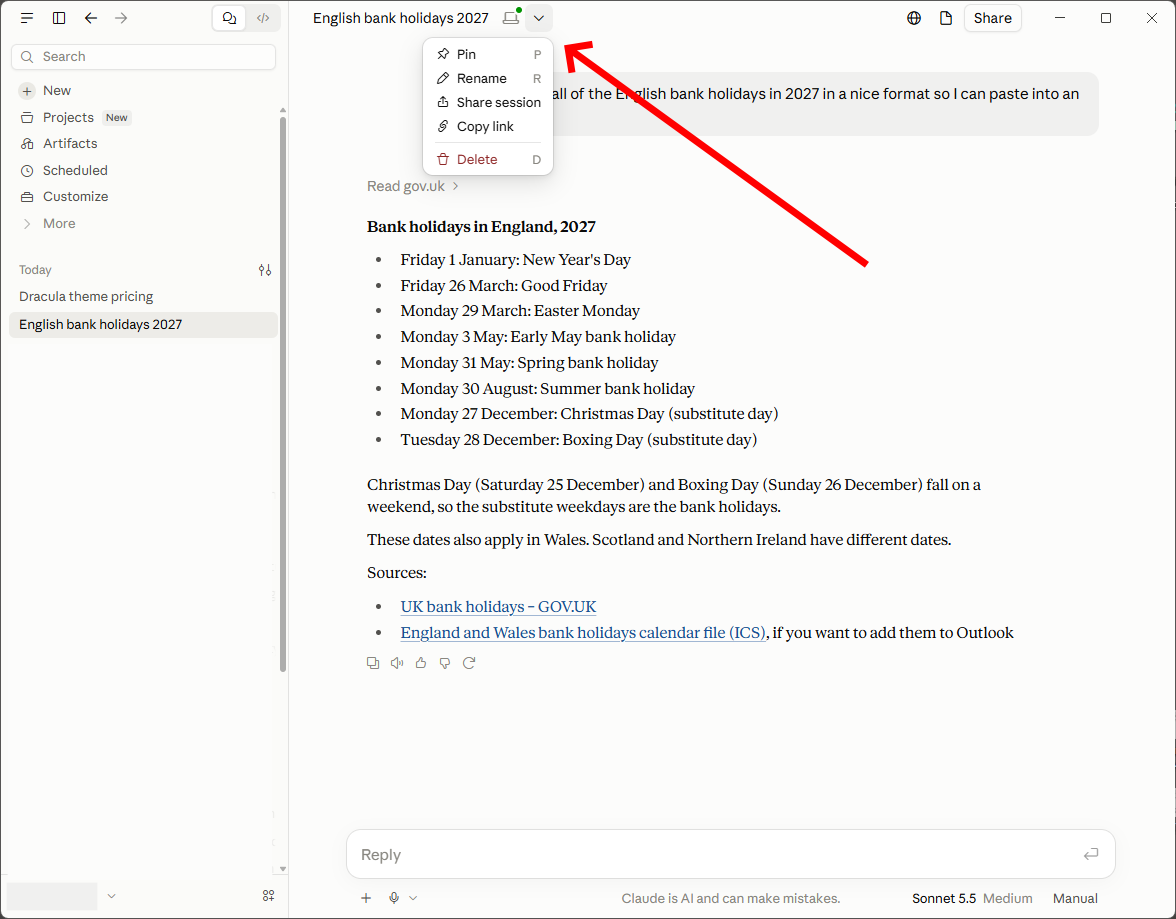
- At the top, to the right of the chat's title there is a drop down menu.
- Select
Copy Link
- Generate:
- Chats are private by default
- Shared links
Troubleshooting
- When I send a prompt I get no response
- Q:
- When I send a prompt I get no response, it returns empty immediately with my prompt still in the box?
- It just started 3 minutes ago. It happens on both claude.ai windows browser chat and Android Claude app.
- Using the desktop app or a different browser made no differences.
- Not taking prompts.
- A:
- The Claude services is down, check the status of the services using Claude Status - Real-Time Outage & Uptime Monitor
- Q:
- Pressing an arrow key cycles through the message history and wipes my current context window, how do i disable this?
- This is a known bug, not just in the VSCode platform.
- VSCode extension: Up arrow key in input field overwrites typed text with history · Issue #37401 · anthropics/claude-code · GitHub - closed as duplicate
- Prompt Input: Unexpected Text Loss on Up Arrow Key Press · Issue #6275 · anthropics/claude-code · GitHub
- If a response gets cut off because it hit a length limit before finishing, here's what actually works:
- Just say "continue" (or "keep going") — Claude will pick up where it left off in the same conversation.
- Alternatively "continue where you left off" works pretty well.
- If it restarts from scratch instead of continuing cleanly, be explicit: "Continue from where you stopped, don't repeat what you already gave me."
- For code or long documents specifically, ask it to continue from a specific marker, e.g. "continue from the save_config function onward" — that avoids ambiguity about where the cutoff was.
- If the answer got cut off partway through something structured (a table, a numbered list, a file), it's often cleaner to ask for just the remaining section rather than "continue," since that guarantees no duplication.
- If it's a genuinely huge task (e.g. a very long document or large piece of code), it can help to ask upfront for it in chunks rather than all at once — that avoids hitting the limit mid-flow in the first place.
- Just say "continue" (or "keep going") — Claude will pick up where it left off in the same conversation.
Claude Plugins
- Development
- How to Build Claude Code Plugins: A Step-by-Step Guide | datacamp
- A complete guide to Claude Code plugins. Discover how to install extensions, choose between Skills and MCPs, and build a custom session logger from scratch.
- How to Build Claude Code Plugins: A Step-by-Step Guide | datacamp
- .claudeignore
.claudeignoreis not a native Claude Code feature.- There is a third-party npm package called
claude-ignore GitHub - li-zhixin/claude-ignore A Claude Code PreToolUse hook that prevents Claude from reading files that match patterns in .claudeignore files, similar to how .gitignore works. - li-zhixin/claude-ignore
- claude-mem
- GitHub - thedotmack/claude-mem
- Persistent Context Across Sessions for Every Agent – Captures everything your agent does during sessions, compresses it with AI, and injects relevant context back into future sessions. Works with Claude Code, OpenClaw, Codex, Gemini, Hermes, Copilot, OpenCode + More
- claude-mem + cmem — AI agent memory, everywhere
- AI agent memory, everywhere. claude-mem is open-source memory for Claude Code; cmem links it to any MCP client — Cursor, Codex, more — via one private link.
- claude-mem takes notes while your agent works — then syncs them to the cloud behind one private MCP link. Pick up exactly where you left off. Every session, every machine.
- Adding Persistent Memory to Claude Code with claude-mem — Plus a DIY Lightweight Alternative - DEV Community
- The Problem: Claude Code Forgets Everything. Every time you start a new Claude Code session, the slate is wiped clean. Your coding style preferences, project architecture decisions, yesterday's debugging session — all gone.
- claude-mem: A plugin that gives Claude Code a long-term memory. It automatically captures what you do during sessions and injects relevant context into future conversations.
- GitHub - thedotmack/claude-mem
Claude Legal
Terms and privacy stuff
- TL;DR
- Free, Pro and Max are classed as consumer accounts.
- Enterprise accounts do not retain inputs and outputs for the use of Anthropic.
- All inputs and outputs are retained by default for Free accounts for the use of Anthropic, this cannot be turned off. (need to check for Europe)
- All inputs and outputs are retained by default for Pro and Max accounts for the use of Anthropic, but this can be turned off.
- Privacy Settings --> Toggle "Help improve Claude": OFF
- This ensures your future conversations are not used to train Anthropic’s models, though it does not automatically remove data that was already processed.
- Data can be retained for 5 years if you do not opt-out.
- NB: when I created a Pro subscription, I was already opted out for helping Claude. I am in the UK, so this might also be a European thing.
- Pro and Free allow Non-commercial use only.
- You agree not to use our Services for any commercial or business purposes and we (and our Providers) have no liability to you for any loss of profit, loss of business, business interruption, or loss of business opportunity.
- You cannot use claude to make products or algorithms that will complete against claude.
- You may not access or use, or help another person to access or use, our Services in the following ways: :To develop any products or services that compete with our Services, including to develop or train any artificial intelligence or machine learning algorithms or models or resell the Services.
- If you cancel during a period, your service will run to the end of the period. You do have to give 24+ hours before the renewal day, so do it 48 hours before your renewal date to ensure no re-billing.
- Official
- Consumer Terms of Service Anthropic
- no commercial use for personal accounts.
- Usage Policy Anthropic
- Usage Policy Update Anthropic
- Paid Plan Billing FAQs | Claude Help Center
- If payment fails, you will be downgraded.
- If you want to change the subscription date, then unsubscribe and then subscribe on the wanted date.
- Consumer Terms of Service Anthropic
- 3rd-Party
- Who Owns Claude's Outputs? Constitution, Copyright & Commercial Rights 2026 | Terms.Law - Anthropic's 23,000-word Constitution (Jan 2026) defines Claude's 4-priority hierarchy. Output ownership, commercial rights, Free vs Pro vs API terms explained.
- You own outputs (if rights exist) when compliant
- Copyright uncertain prompts alone won't protect you
- No training opt-out for free tier users
- API/Enterprise = strongest commercial rights
- Copyright myth #3: ‘I can use materials without permission if the use is non-commercial’. | UCL Copyright Queries
- Anthropic's Claude AI Updates - Impact on Privacy & Confidentiality | AMST Legal
- Claude AI Privacy. Does Claude train on your data? Yes, under new Consumer Terms. Learn the privacy policy changes & protect your business.
- This explains everything very well
- Who Owns Claude's Outputs? Constitution, Copyright & Commercial Rights 2026 | Terms.Law - Anthropic's 23,000-word Constitution (Jan 2026) defines Claude's 4-priority hierarchy. Output ownership, commercial rights, Free vs Pro vs API terms explained.
Other AI (ChatGPT, CoPilot, etc..)
ChatGpt
- Legal
- OpenAI's ChatGPT Updates - Impact on Privacy & Confidentiality | AMST Legal - ChatGPT Privacy. Does OpenAI train on your data? Yes, under the new Terms. Learn more how it works and how to protect your business.
- Troubleshooting
- I cannot click on additional links in the modal
- The Issue
- When you give links in your answers and there is more than one, they are presented in a modal with arrows to move to the next one.
- My issue is when i click the next arrow the new box is drawn away from my cursor so when i move my mouse to click on it the box disappears, how can I fix this so i can access the other links?
- Cause
- This is a UI bug.
- When a the next link name is too short to encompass the cursor, the cursor becomes immediately of bounds, so if you move the cursor to click on the link in the modal, it is closed becaseu the javascript recognises the cursor is out of bounds and performs a close event.
- Workaround
These avoid moving the mouse away from the original hover target, so the modal doesn't disappear.
- Option 1
- Click the link button to open the link-preview modal.
- Press Tab once.
- Press Space to activate the focused arrow.
- Keep pressing Space to cycle through the links.
- Option 2
- Click on the webpage in any normal area
- Hover the mouse over the link button, do not click, the link-preview modal will now appeare
- You can now use the arrows keys to cycle the links
- Move the cursor down to click on the link
- Option 1
- The Issue
- I cannot click on additional links in the modal